saldiaSearch AI: now someone is there in your online shop too
The new AI assistant advises in your shop, knows the order status and suggests what fits – with products from your real catalogue. And the search is rebuilt.
 Lorenz Schmid 9 min read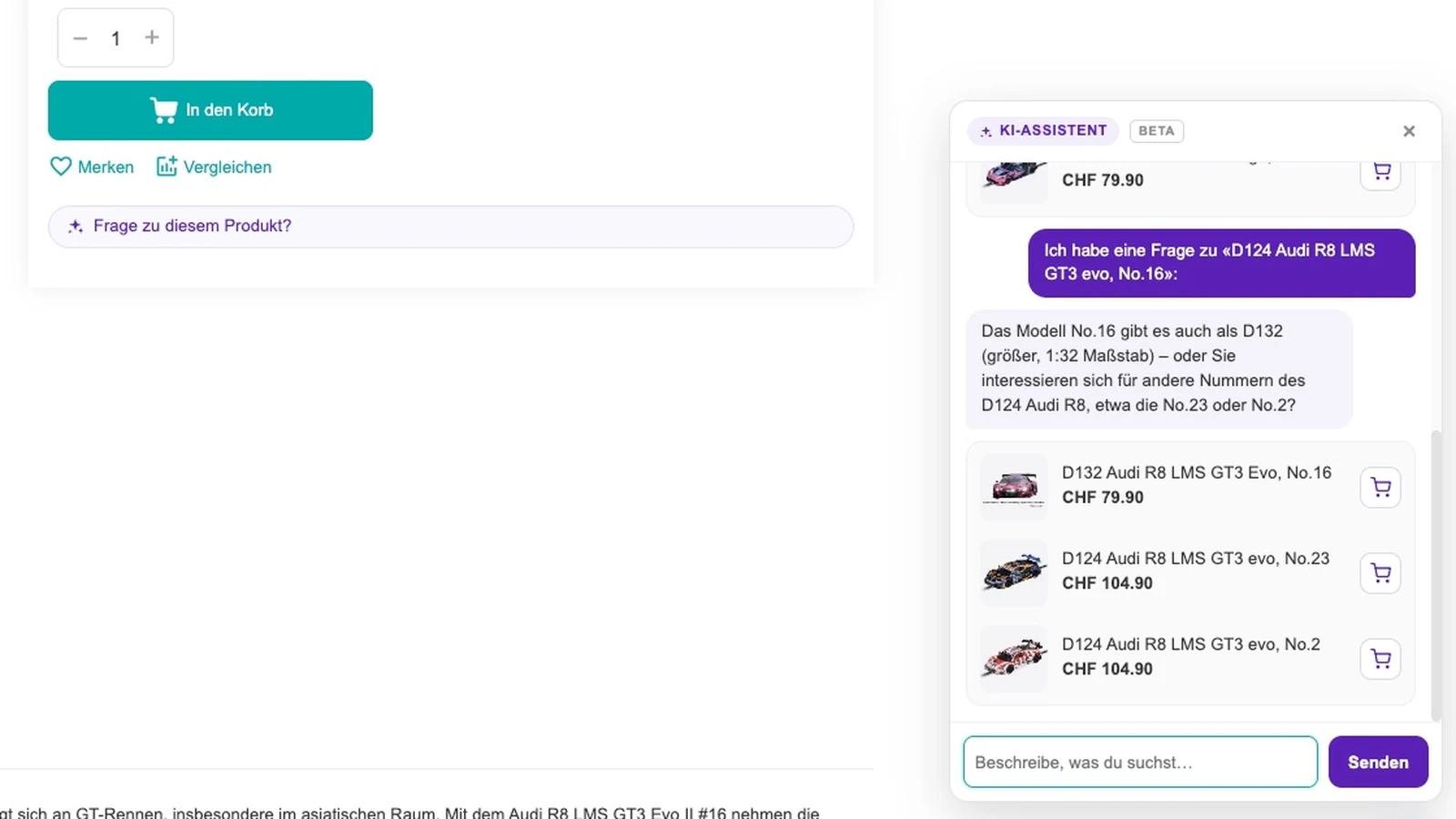
In a physical shop, someone is standing there. Anyone unsure asks a question – and gets an answer that fits the range on the shelves. In an online shop nobody is standing there. Anyone unsure types something into the search field, gets two thousand results or none, and leaves.
That is exactly the gap we built saldiaSearch AI into this summer: a shopping assistant that advises inside the shop, answers questions about orders and suggests what fits – exclusively with products that really exist in that shop. It is new, currently in beta, and enabled per shop.
And because an assistant is only as good as the search beneath it, we rebuilt saldiaSearch itself at the same time. Both are covered here – the assistant first.
saldiaSearch AI: six places where otherwise nobody is there
The assistant is not a chat window laid over the shop, waiting for clicks. It sits where someone in a shop would be asked:
- In the still-empty search window. Before anything is typed it picks up on the product viewed last and suggests what fits.
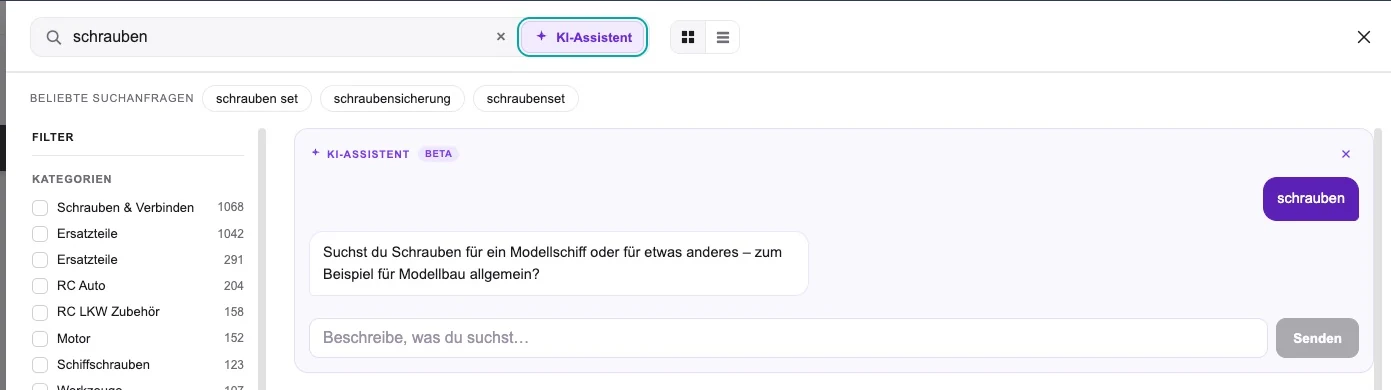
- In the search field, as soon as someone types. From the second character an AI button appears. One click sends the query to the assistant; the answer shows above the results while the result list stays put.
- When a search finds nothing. Then it speaks up by itself – once per query, and only there. Never on a successful search.
- On the product page. A discreet line, “question about this product?”, opens the chat with the product already in context.
- On products that are not in stock. Exactly where the buy button is missing, deliverable alternatives appear instead of a refusal.
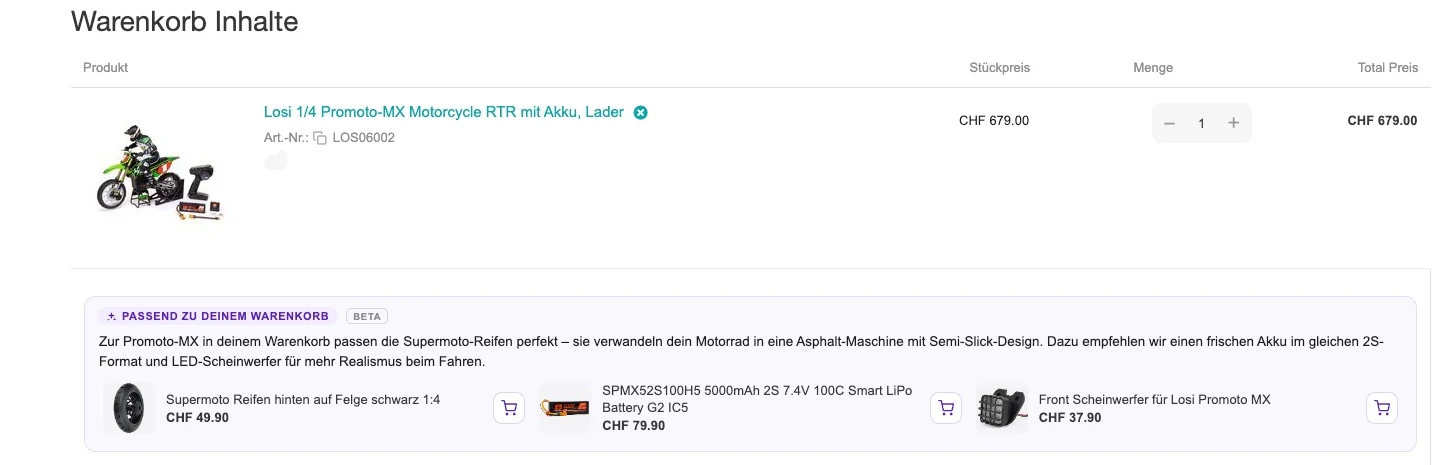
- In the basket. What goes with the current selection – with a reason, not just a list, and inside the basket page itself.
What it can do – and what it deliberately doesn’t
Advising here means advising from the catalogue. “What goes with …” returns product cards with image, price and an add-to-basket button. Compatibility questions – which battery, which spare part, which variant – are answered from the spare-part and accessory links the shop maintains anyway. It doesn’t guess, it looks up.
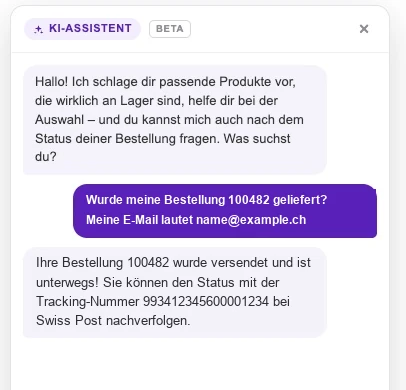
On top of that comes the single most common support request: “where is my order?” Logged-in customers get the answer straight away, guests via order number and e-mail. Access is strictly read-only – status, date and tracking number come back, nothing else.
And because shops get more than product questions, there is a free-text field in the backend: shipping costs, return periods, opening hours. What you write there is what the assistant answers with – instead of a blanket referral to support.
Just as important is what it does not do:
- It cannot invent products. It may only suggest what the search found in your shop beforehand – an article that does not exist cannot end up in the answer at all.
- It never opens by itself. No popup that appears after three seconds.
- It sets no cookies and builds no profile. The conversation lives in the browser session and is gone when the tab closes.
It answers in German, English and French – in whichever language the question is asked.
We stay honest about the limits, too: a language model can get the tone wrong or phrase something awkwardly. What it cannot do in this setup is invent a product: it may only suggest what the search found in your shop beforehand.
Recommendations in the right place
Recommendations are part of the assistant – but only where they answer a question that is coming up right then: deliverable alternatives for an item with no stock, complements in the basket, suggestions in the still-empty search window.
All three appear inside the page, not in a window on top of it. Nothing opens by itself, and what is already in the basket is not recommended again. How the individual placements perform is visible in the backend – more on that below.
Underneath: the search has been rebuilt
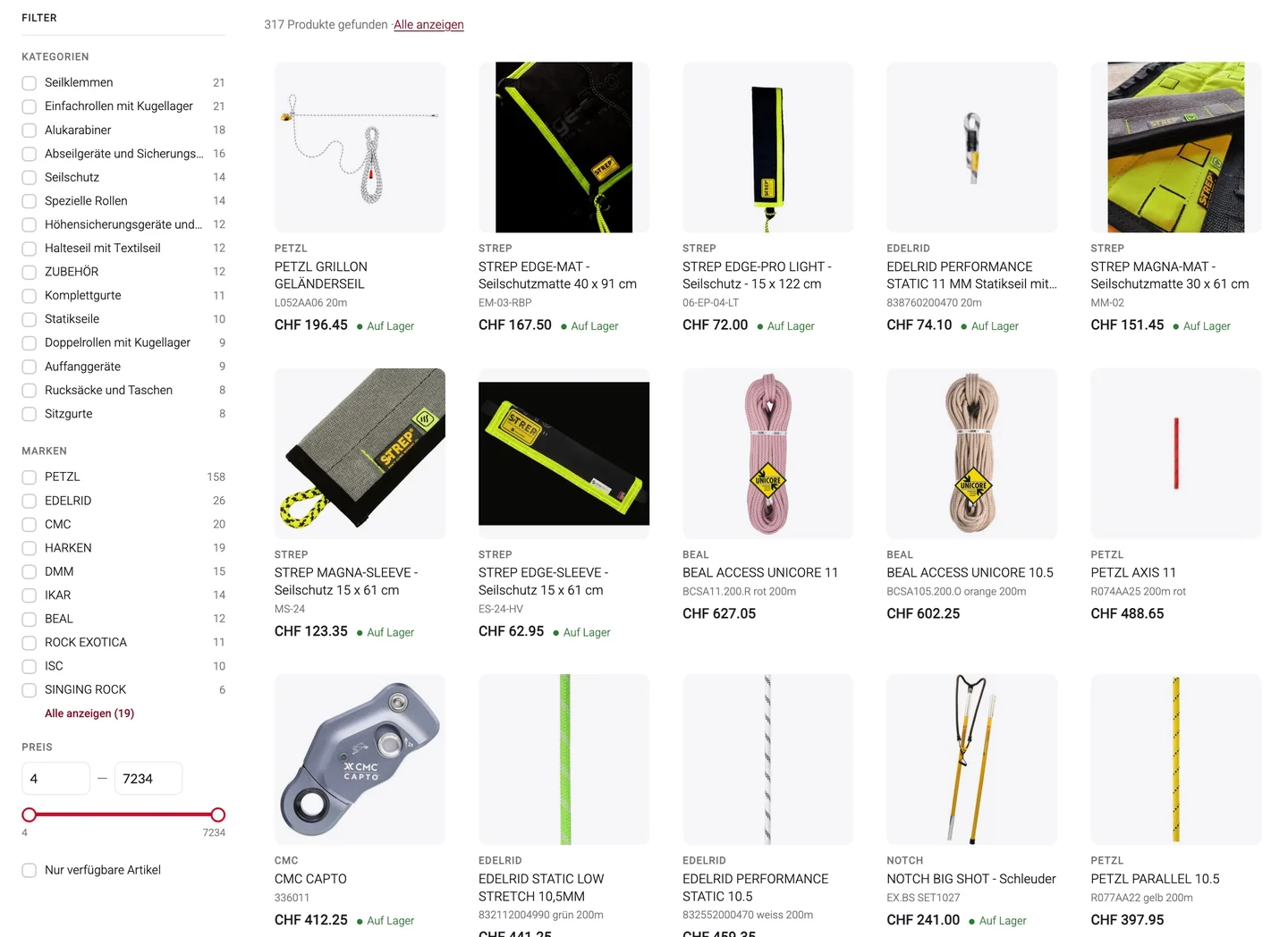
An assistant can only recommend what the search finds. So at the same time: the suggestion list under the search field has become a search window of its own, laying itself over the shop from the second character typed.
- Filter without leaving the search. Categories and brands – only those that actually occur in the current results, each with a count. Price as a slider across the real price range. “In stock only”. And shown separately, what is available at the supplier.
- The filters recalculate live. A combination that leads to zero results therefore doesn’t exist.
- Grid or list, default set separately for desktop and mobile – with image, name, price, SKU and stock status on every card.
- Built for mobile, keyboard friendly, and with a back button that works.
When the keyword search finds nothing
There is one metric almost every shop has and almost nobody looks at: the share of search queries that find nothing. It produces no error message and no alert – just an empty page and a person who moves on.
The reason is nearly always the same: a classic search compares character strings. People, though, don’t type the word from the product name but the word they know – the purpose instead of the product type, the brand instead of the model, everyday language instead of catalogue language, on a phone often with a typo.
So saldiaSearch works in stages: first the spelling most likely intended is tried (“did you mean …”, with the results right below). If that doesn’t help, saldiaSearch searches by meaning rather than by letters and shows the closest products under “similar results for …”. And only if even that comes up short does the assistant speak up. The meaning-based search works not just in the search window but on the shop’s search and category pages too – and it runs on our own Swiss infrastructure.
What you see in the backend
Above the list of search queries it now says how many of them found nothing – as a number and as a share. One click filters the table down to exactly those rows, and every term links into the storefront search. A statistic becomes a to-do list: look at the term, retrace what the customer saw, then decide – add a synonym or close a gap in your range. Our experience from the first weeks: most of these queries aren’t gaps in the catalogue, they are words your catalogue doesn’t know yet.
The second view shows what saldiaSearch AI achieves: per placement, impressions, clicks, add-to-basket events, the basket value triggered and the five most-clicked products – for 7, 30 or 60 days.
From development: what the numbers said
A caveat first: all figures in this section come from the beta phase, from two shops and from periods of one to two weeks. They show how we decided – they are not a guarantee for your catalogue. Longer measurements across more shops are running; the results will follow.
The empty results page
Measured at a Swiss specialist retailer with around 335,000 items. In the first ten days after the switch, the share of searches without a result there fell from over 8 % to practically zero. A second shop that also received the switch confirms this independently.
| Period | Searches without a result |
|---|---|
| before the switch | over 8 % |
| first ten days after | practically zero |
The cleanest confirmation comes from a coincidence: the same shop runs a French-language storefront that had not yet received the meaning-based search at that point. There the share stayed unchanged over the same period. Same shop, same catalogue, same week – just without the change.
That is a dated snapshot from August 2026, not a standing promise: as soon as customers search for terms your catalogue does not cover, searches without a result appear again. That is exactly what the work list in the backend is for.
From the same analysis, in passing: around a third of search sessions lead to a click on a result.
Why we deleted our own popup
For the recommendations we had built two variants: one fixed inside the page, one as a floating window on top of it. After seven days the order was unmistakable – and not the one we would have bet on.
The most clicks happened where the customer had asked herself: in the AI chat, 12–17 % of visitors click the recommended products. The unassuming block in the middle of the basket page sat clearly below that – and the floating window, which demanded the most attention, came last. It was seen more often than the block inside the page and still clicked less.
So we deleted it. Not toned down, not shown less often: removed.
The same logic showed up in reach: the very same chat function is opened far more often when it sits in the search field than when it hides behind a floating button. Where a feature sits decides more about its effect than what it can do.
The lesson we took away: asked beats unasked. And inside the page beats on top of the page.
How to get both
saldiaSearch – the search window with filters, the meaning-based search and the real-time index – starts at CHF 49 per month and can be activated with one click in the saldiaApps of your saldiaShop. If you already use saldiaSearch, the new features come at no extra cost; they are enabled per shop.
saldiaSearch AI is the new add-on and currently in beta: switched off by default, enabled for your shop on request. If you would like to try it, get in touch – we will switch it on for you.
All the details are on the saldiaSearch product page.