
saldiaCore The all-in-one business software for Swiss SMEs
The all-in-one business software for Swiss SMEs: CRM, support, projects, time tracking and HR in one solution – with built-in AI and direct bexio sync.
What is saldiaCore?
saldiaCore is an all-in-one business software for Swiss SMEs that combines CRM, ticketing, project management, time tracking and HR in a single solution. Instead of running several separate tools, you manage customer relationships, support, projects, logged time and staff centrally in one place. A built-in AI searches your data in natural language and handles recurring work through an automation engine. saldiaCore complements your bexio accounting and is hosted in Switzerland.
This product is perfect for you if …
Developed and hosted in Switzerland.
How we use AI
Your entire business — in one software
CRM, support, projects, time tracking and HR in one interface. A real look inside saldiaCore — module by module, the way your team uses it every day.
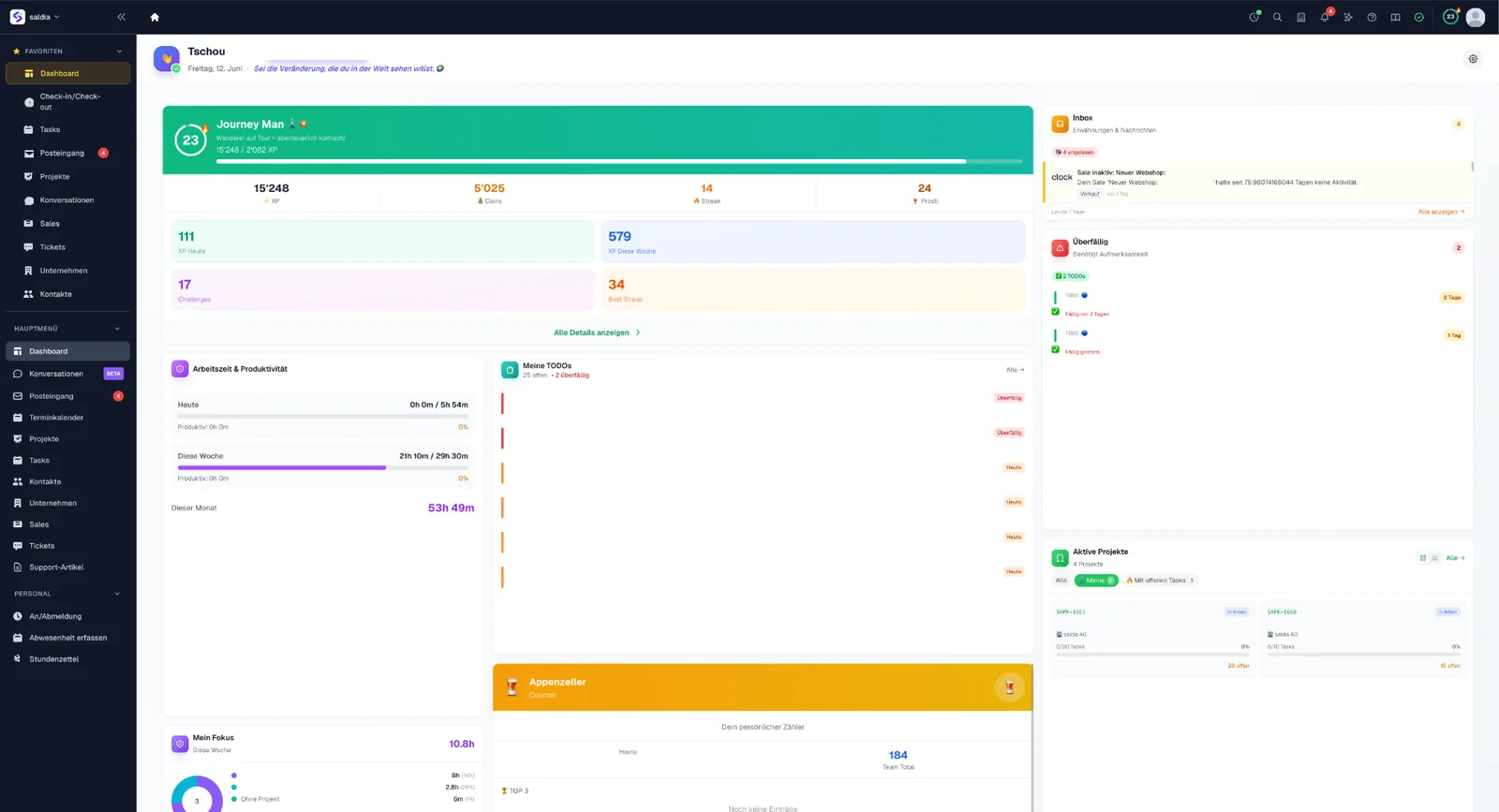
Everything at a glance — your workday starts here.
Working time, open to-dos, active projects, inbox and your progress — the dashboard bundles what matters today. One login for the whole company.
- One login, one dashboard
- Personal & role-based
- Swiss hosting
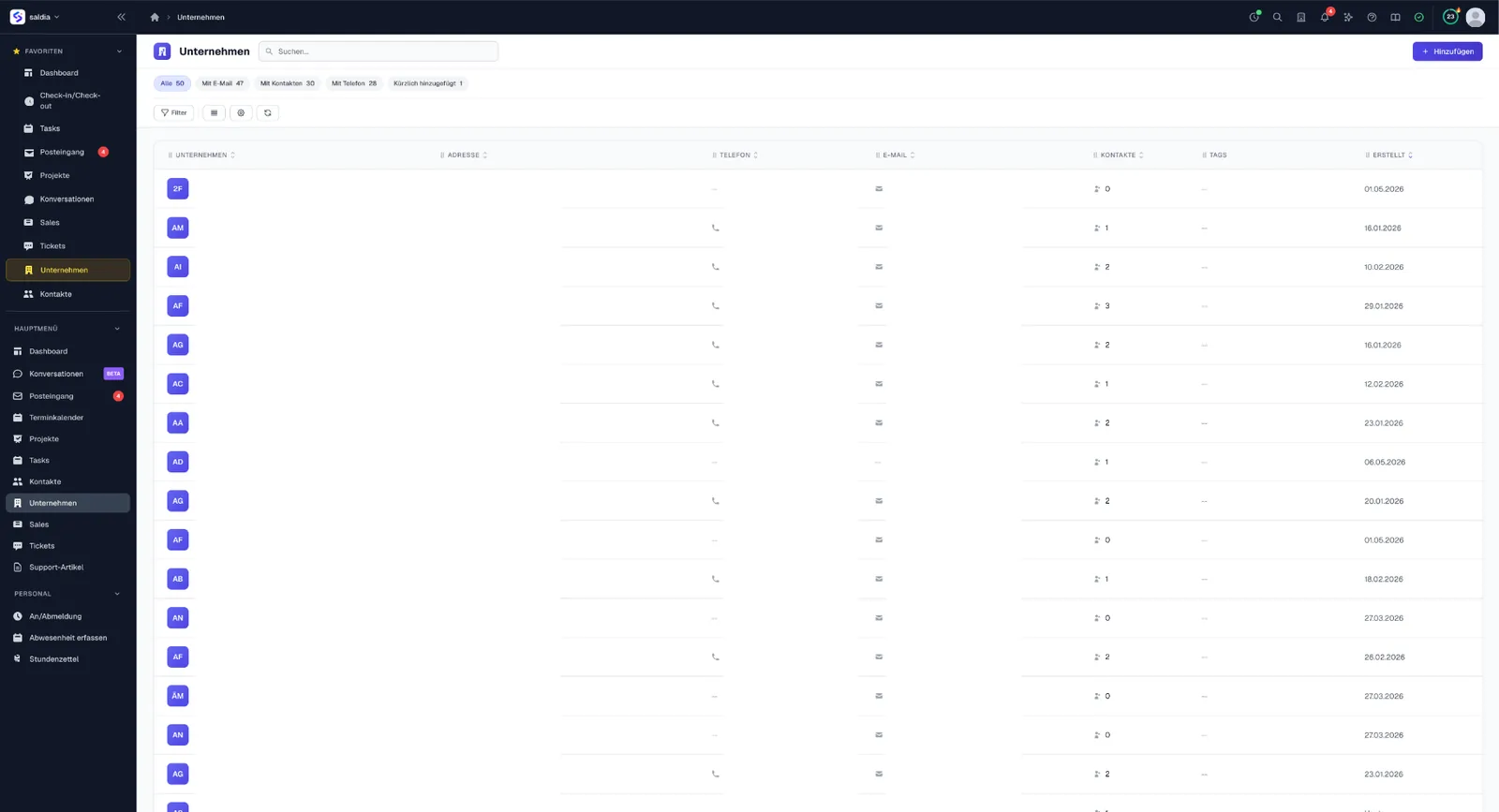
Customers, companies and every conversation — in one place.
Companies and contacts kept tidy, calls and messages tracked across channels. From first contact to close — nothing gets lost.
- Companies & contacts
- Calls & conversations
- Missed items visible instantly
Support that never drops the ball.
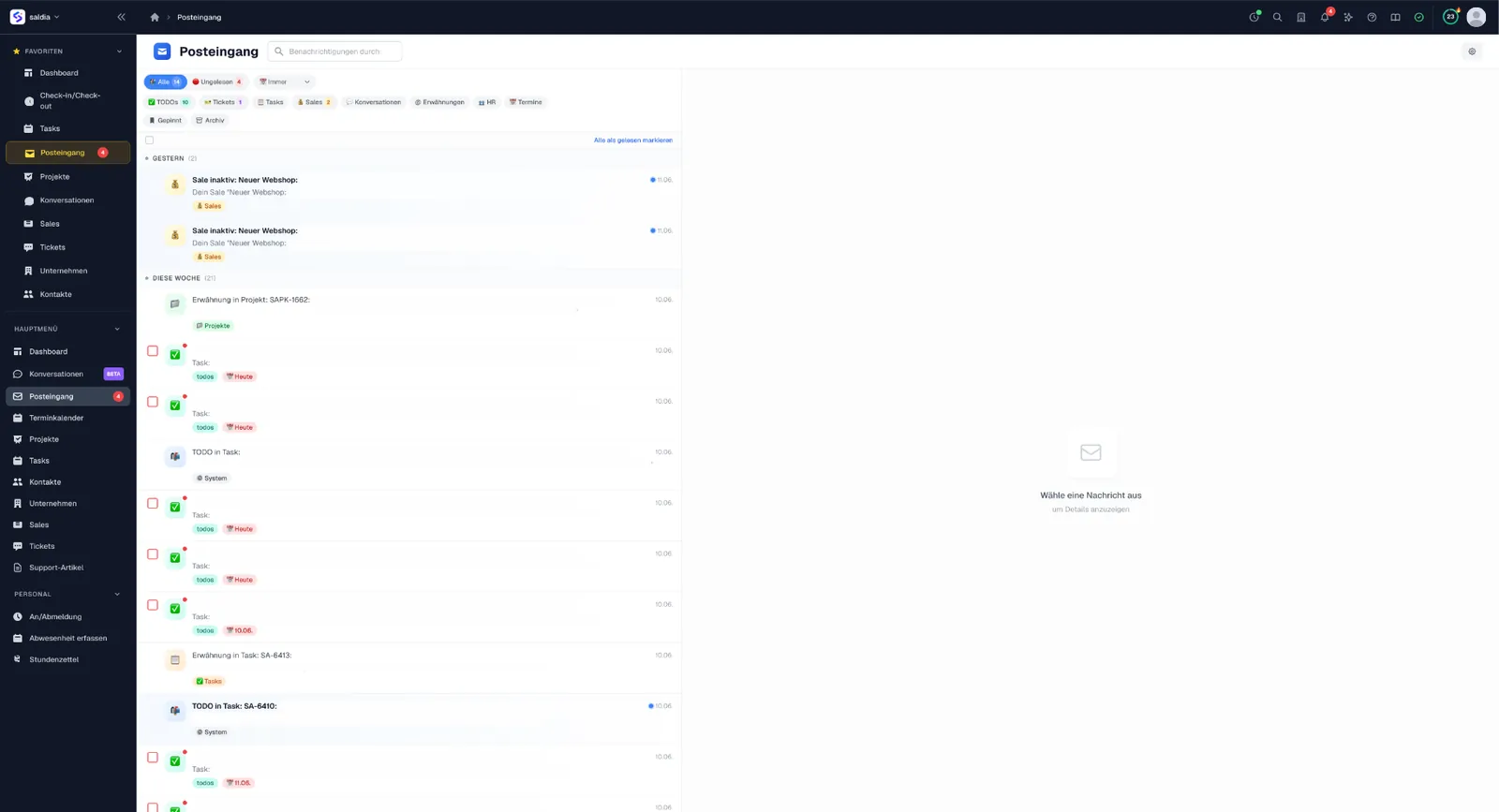
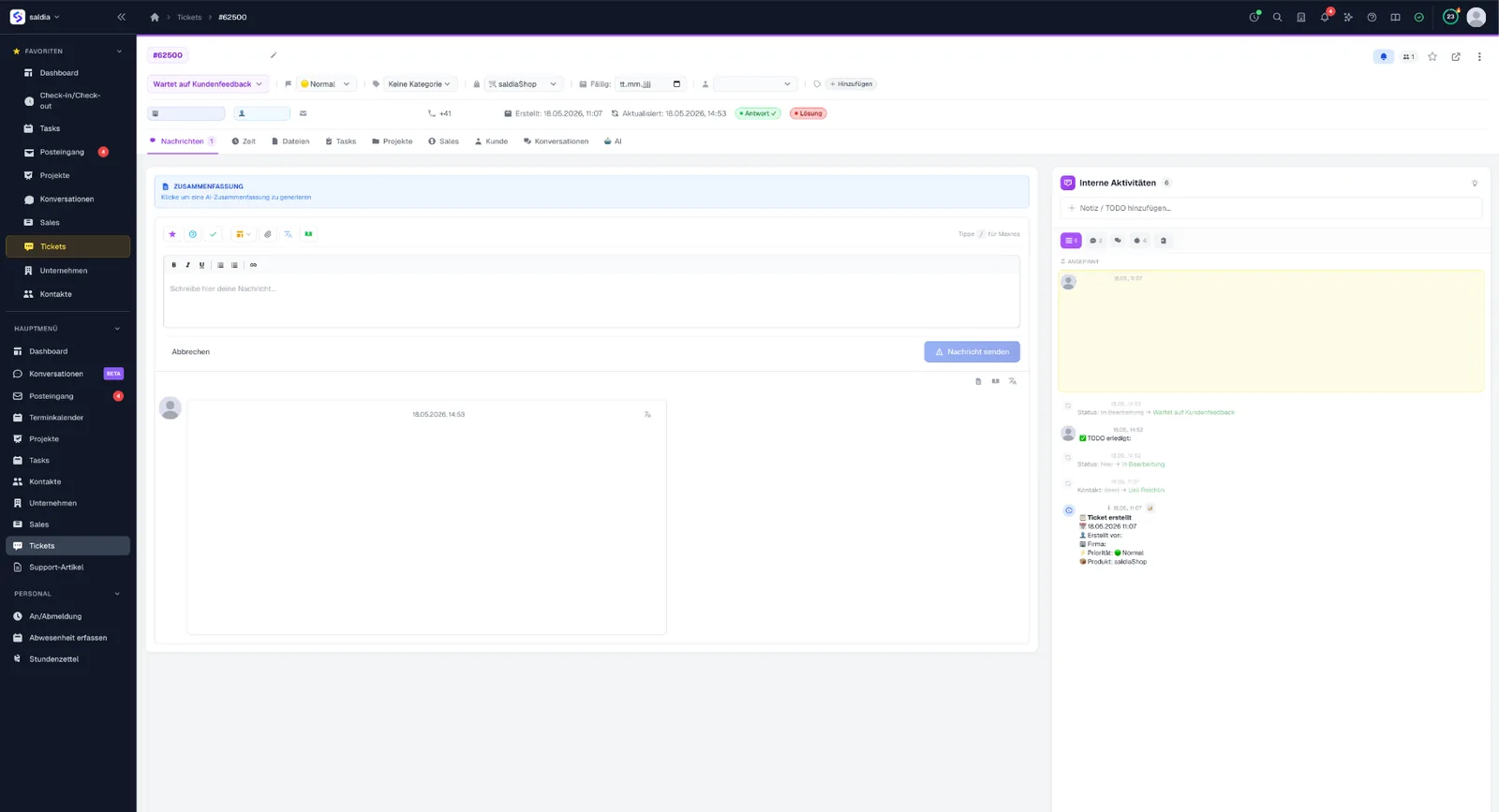
Tickets with status, priorities and AI summary; every notification — tickets, tasks, mentions, sales — flows into one central inbox.
- Ticketing with SLA view
- AI summary
- One inbox for everything
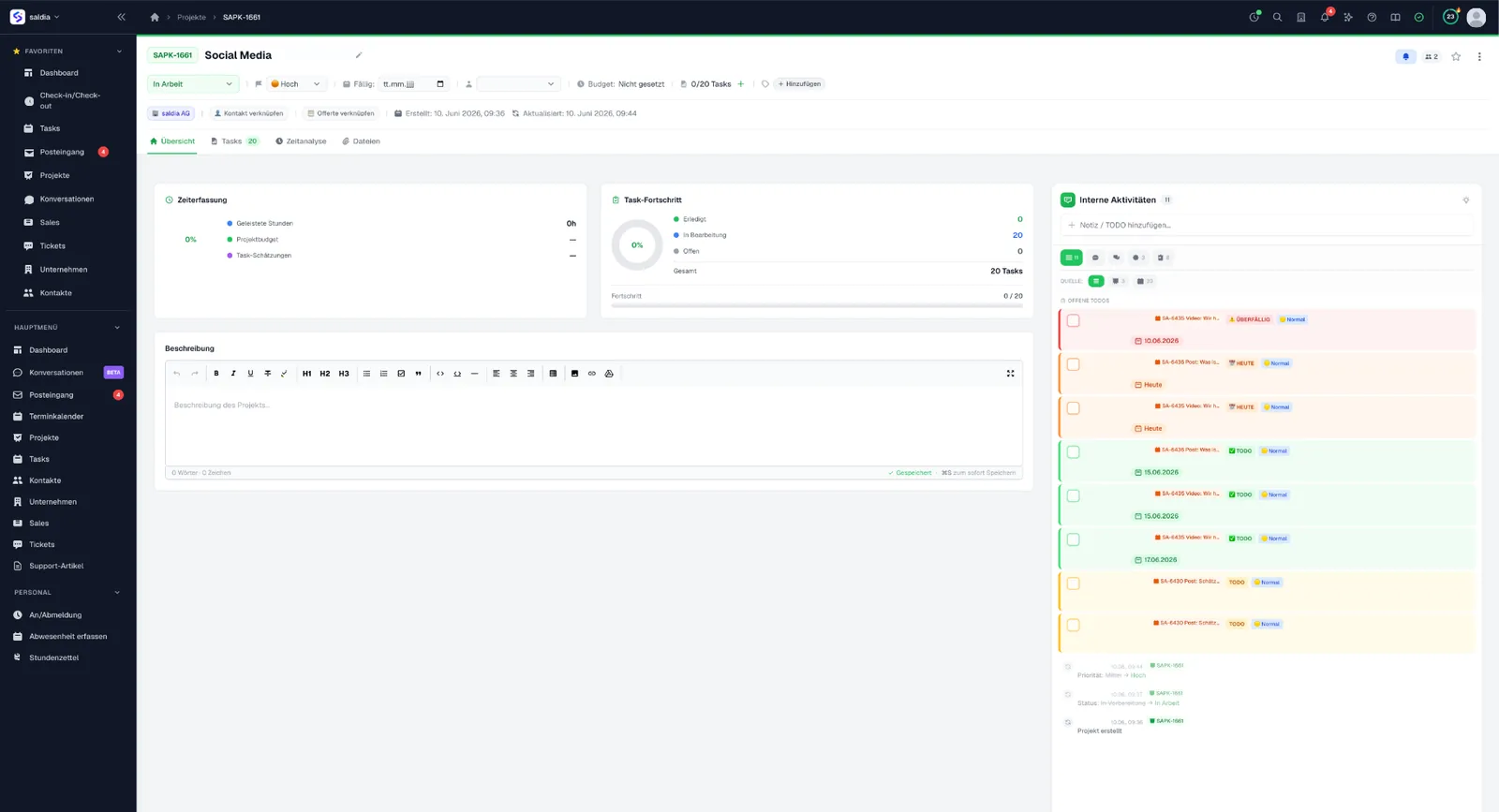
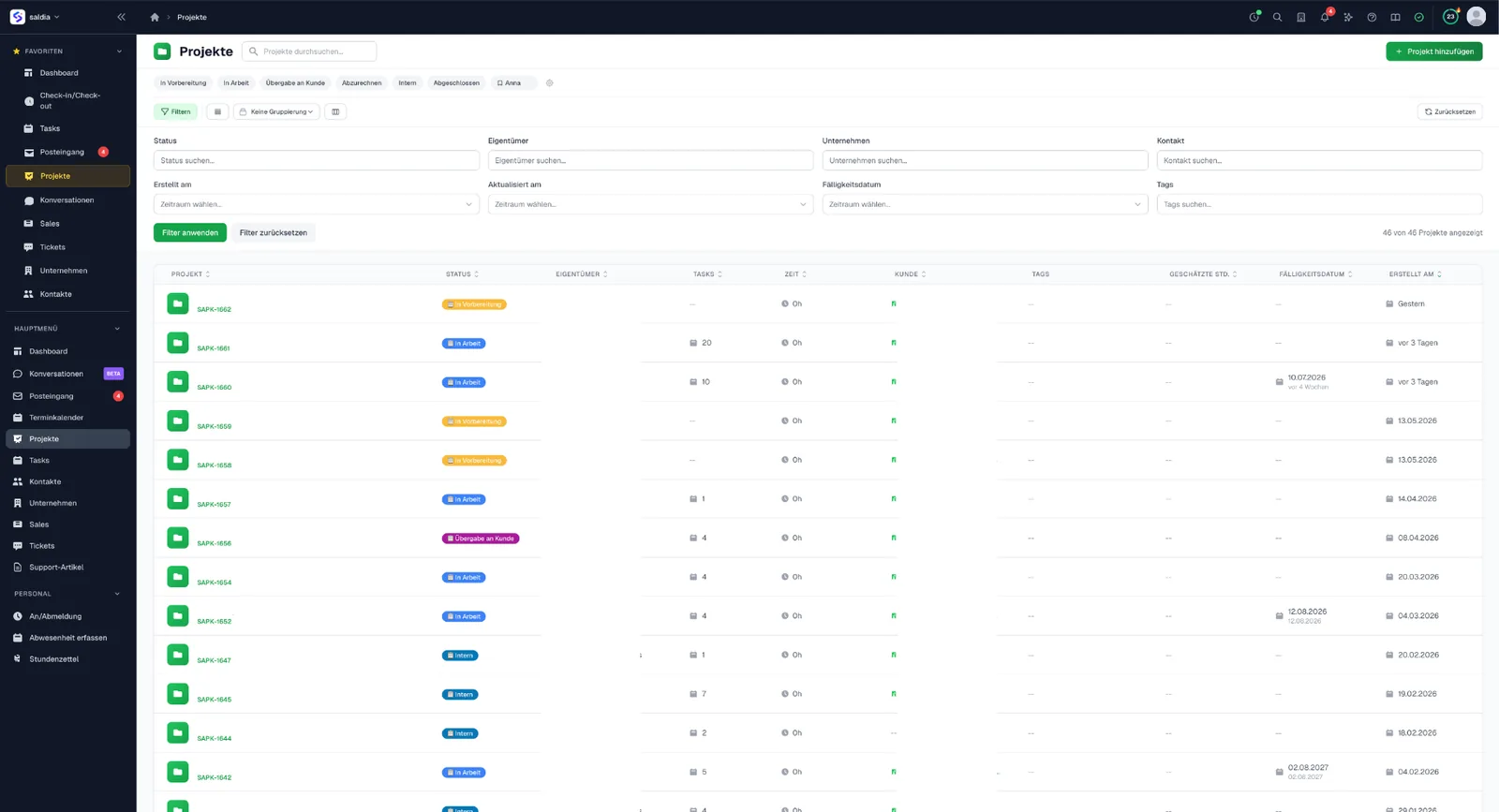
Plan projects, get tasks done, keep time in check.
From the project list to the detail: tasks, progress, time tracking and internal activity — all linked to customers and quotes.
- Projects & tasks
- Time right on the project
- Linked to the CRM
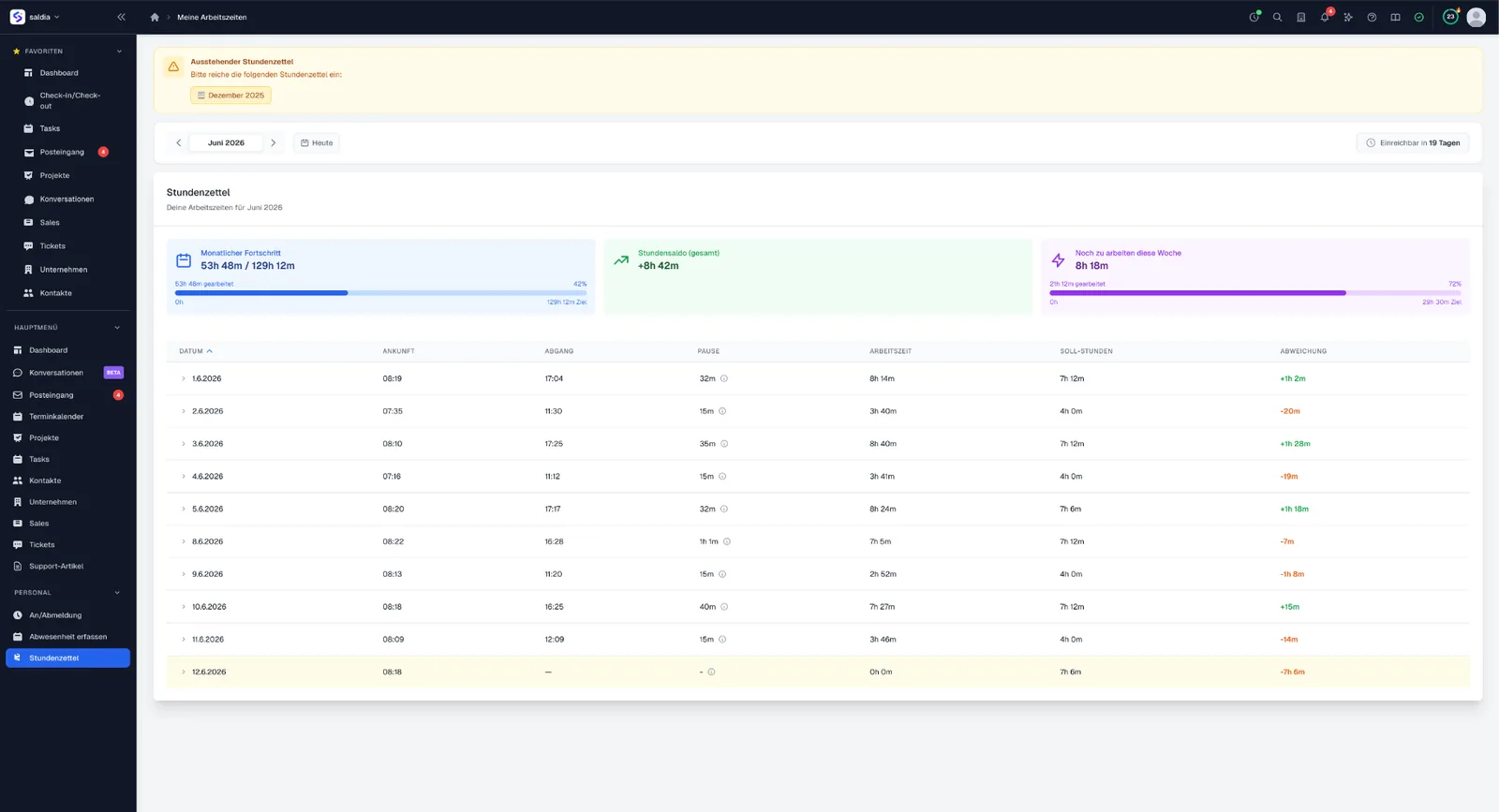
Time tracking and HR — compliant and simple.
Clock in/out with automatic Swiss break rules (ArG), timesheets with target/actual balance, and a calendar for bookings and absences.
Software your team actually enjoys using.
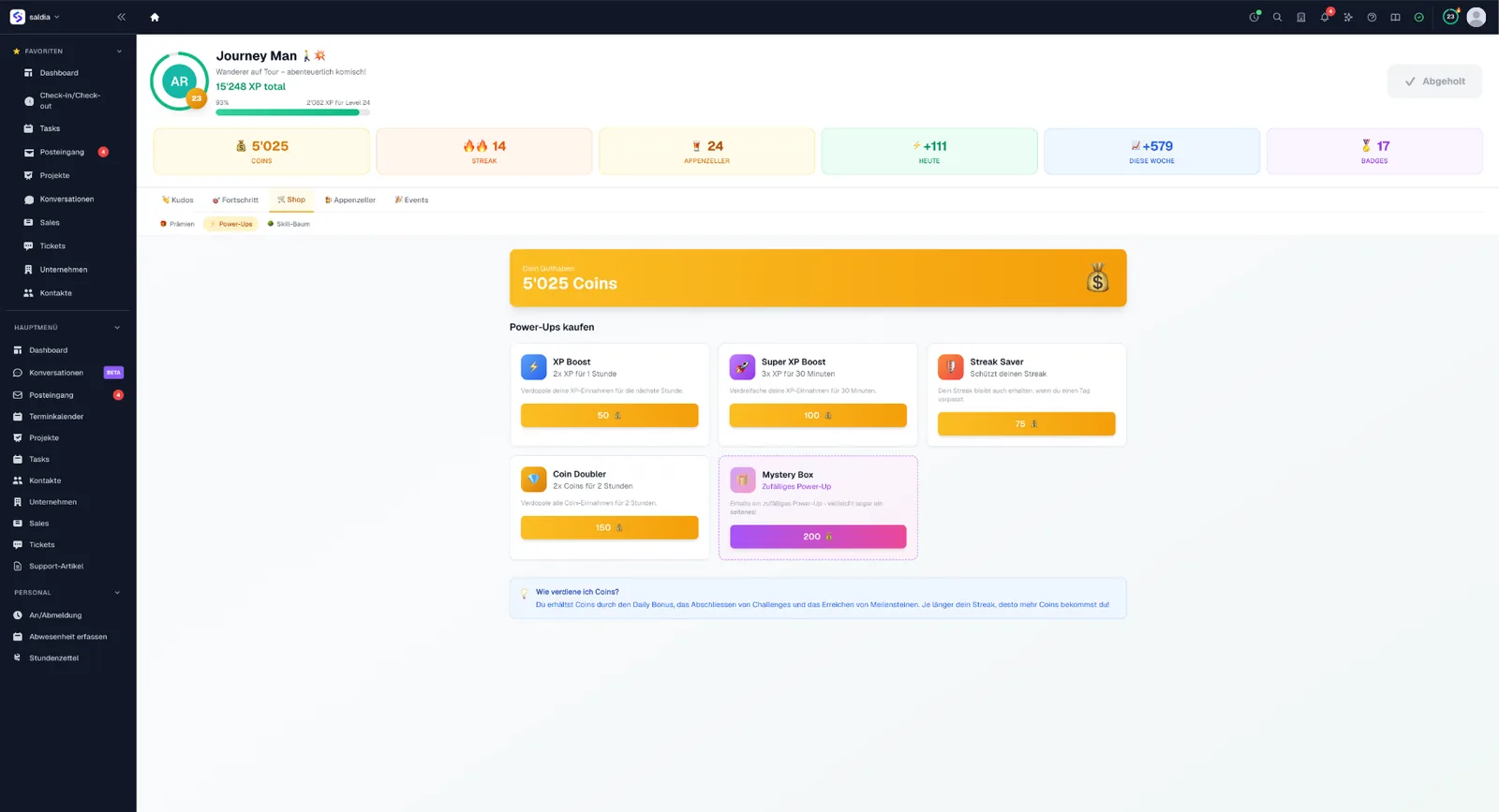
XP, levels, streaks, badges and coins make the workday playful — including a shop with power-ups. Less friction, more staying power.
- XP, levels & streaks
- Badges & achievements
- Coins & power-up shop
One system instead of ten tools.
saldiaCore replaces the patchwork of single tools — with built-in AI and a direct bexio connection, hosted in Switzerland.
All in one software
CRM, support, projects, time & HR under one login.
Swiss hosting & privacy
Data in Switzerland, FADP/GDPR compliant.
bexio connection
Direct sync with your accounting.
AI & automation
Summaries, suggestions and less manual work.
No obligation · tailored to your SME
One search. Your entire company.
Hit ⌘K — and saldiaCore searches everything at once: tickets, contacts, companies, projects, tasks, time entries and more. Ask in plain language: the search understands what you mean — not just which words you typed — and answers questions itself.
⌘K
Tickets
Login error after update
Muster AG · Open · High
Payment import stuck
Muster AG · In progress · High
Contacts
Petra Muster
Muster AG · Management
Projects
Website relaunch Muster AG
In progress · 68 %
Tip: press ⌘K — right here on this page — to flip through the examples.
⌘K — from anywhere
One shortcut, no matter which module you are in. Search, jump, keep working — no mouse, no detours.
Ask in natural language
“Urgent tickets from Muster AG” or “tickets from Sandra last week” is enough — the AI sets data type, person, time range and status itself.
Understands meaning, not just words
Search for “customer can’t pay” and find “payment was not successful”. The search thinks in related meaning — synonyms and typo tolerance included.
An answer, not just a hit list
Ask a question and the search replies in two sentences — grounded in clickable sources from your own data, so you can verify it.
15 data types, one search box
From tickets, contacts and companies to projects, tasks and sales, right down to time entries, focus cards, help articles and internal wiki pages.
Milliseconds, not minutes
Lightning-fast full-text search with typo tolerance — results appear while you are still typing.
Permissions included: every team member only finds what they are allowed to see.
Just landed
saldiaCore keeps getting better — these are the latest big updates.
Universal Search 2.0 — plus scheduling polls and an internal wiki
The ⌘K search now understands meaning, not just keywords, and answers questions directly with sources. On top: two new modules, an intranet start page for your team and AI across the system.
- Semantic search
- AI answer card
- People & time ranges
- Command palette & deep links
- +10 more
Sales: multi-pipelines and the Today view
Sales now thinks in pipelines: several independent workspaces, an interactive kanban and a Today view that tells you what’s next. And in support, nothing gets lost anymore.
- Multi-pipelines
- Interactive kanban
- Today view with next steps
- Unified lead intake
- +2 more
Everything included. One login.
The all-in-one business software for Swiss SMEs: CRM, support, projects, time tracking and HR in one solution – with built-in AI and direct bexio sync.
Cockpit
3 featuresYour workday starts here: working time, open to-dos, active projects and your progress — personal and role-based, on one dashboard.
Everything at a glance
Working time, open to-dos, active projects and updates — bundled on your personal dashboard.
Role-based views
Every team member sees exactly what matters for their role.
One login for everything
All modules under one login — no tool switching, no duplicate entry.
Inbox
3 featuresEvery notification flows into one place — from tickets, tasks, mentions and sales. Nothing slips through.
Central notifications
Tickets, tasks, @-mentions and sales updates in one inbox.
To-dos & overdue items
Open items and due dates show up right in the inbox.
Unread overview
Unread counters and a recent history for working through things in order.
Focus
14 features NewYour personal focus space — deliberately unlike the rest: fewer options, hard limits, lots of automation. Built with aids for neurodivergent people, from one-second capture to tunnel mode. Plus shareable pinboards where the team thinks together, live.
One card = one thought
No type, no required field, no category when you capture — what a card is depends on where it sits: a note or idea on the pinboard, a to-do in Later and Today, history in Done.
Capture in a second (⌘J)
From anywhere in the system: press ⌘J, type your thought or speak it via the mic, hit Enter. Everything lands on the pinboard first — sorting comes later, because every required field kills the impulse.
Focus AI: talk to your board
Speaking doesn't just create cards — Focus AI understands commands and executes them: "the quote card to today", "… is done", "break … into steps". With a review of what happened and undo — Swiss German included.
Today: only 3 at once
Not a daily quota but a simultaneous limit — 20 things done in a day is no problem. What's capped is how much competes for your attention at once. That's why it deliberately can't be raised.
Priority = position
No priority field — high/medium/low always ends with everything being 'high'. What matters is what's on top: drag the cards into the order you want to tackle them.
A date makes a to-do
Give a card a due date and it moves onto the board into Later and stops decaying. Due items are quietly sorted to the top and subtly marked — never screamed at in red.
Mirror cards from the system
To-dos assigned to you plus dated tasks, tickets, projects and sales show up automatically as cards with an origin badge. Ticking one off really completes the original — nothing due stays invisible.
The pinboard — your thinking space
A free canvas: cards stay where you drop them, and your layout is saved. Double-click to add labels, use '+ Zone' for colored areas — build your own sections spatially, without folders.
One board, areas as a lens
Business, personal, club: areas filter the single board instead of splitting it. Multiple boards would hide things — what you don't see doesn't exist.
Shared pinboards for the team
Create shared idea spaces (brainstorming, retro, SWOT via templates with ready-made zones), visible to members only or the whole workspace. Pull an idea 'to my board' or assign it to someone — your personal board always stays private.
Think together, live
On shared walls the team works at the same time: see who's present, vote on cards and react with emojis, connect cards to show flows, a workshop timer for timeboxes — and an AI summary that bundles everything into themes and next steps.
Three focus levels
Board → Zen mode (hides navigation and everything else) → Tunnel (a single card, 5-minute timer, done auto-loads the next). The tighter the level, the less can interrupt. The timer is small on purpose: starting is the hurdle, not keeping going.
The board tidies itself
At midnight, anything unfinished quietly moves from Today back to Later — no overdue stamp, the day starts fresh. The weekly check asks about old items: keep, board or delete. Deleted something? One 'undo' brings it back.
Interactive tour
The board explains itself: a spotlight tour walks through the real elements one by one, one sentence per step — automatic on your first visit, back anytime via the lightbulb.
Contacts & Companies
3 featuresKeep contacts and companies in one place — with activity history, custom fields and segments. The foundation for sales, support and projects.
Contacts & companies
Keep all contacts and companies in one place, including activity and customer history.
Custom fields & segmentation
Add your own fields and group contacts into segments with tags.
Linked to everything
Tickets, projects, time entries and deals attach right to the contact — the full history in one place.
Sales & Pipeline
5 featuresMove deals through a visual pipeline, spot risks early and measure what works — all the way to quotes via bexio.
Visual sales pipeline
Move deals as a Kanban through seven stages – Lead, Qualified, Proposal, Negotiation, On Hold and finally Won or Lost.
Deal health scoring
Every deal gets a rating – Healthy, Attention or Critical – so you spot risks early.
Automatic follow-up reminders
Get reminded about inactive or soon-to-close deals before they go stale.
Sales reports
Analyze weighted pipeline value, win/loss, conversion rate, sales cycle, rep performance and loss-reason and source analysis.
Quotes via bexio
Create quotes and offers directly through your bexio connection.
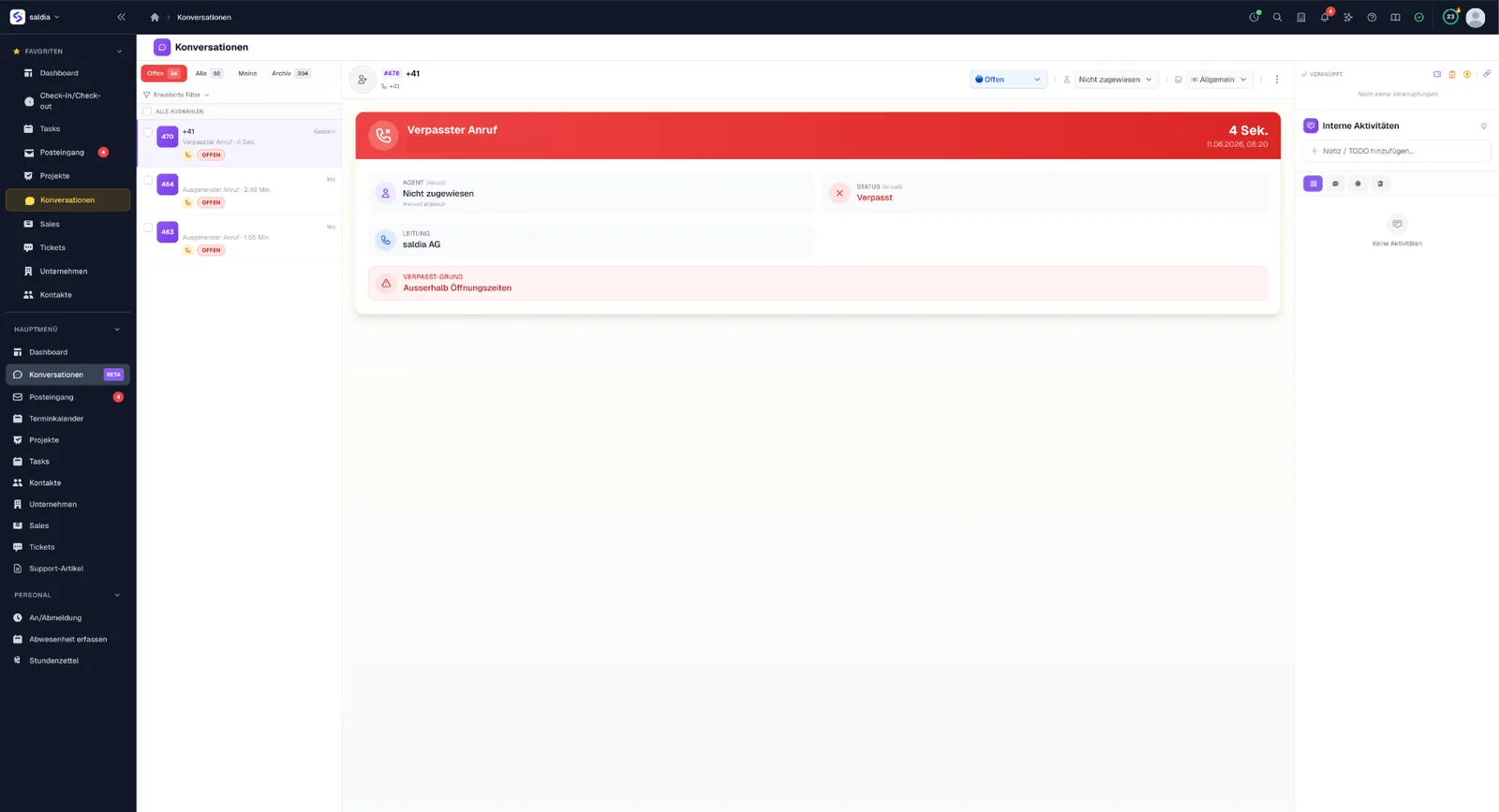
Conversations
3 featuresCalls and messages tracked across channels: Aircall telephony and WhatsApp come together in one place — missed items are visible instantly.
Calls & messages central
Every conversation across channels in a single view.
Aircall & WhatsApp
Aircall telephony and WhatsApp messages connected natively.
Missed items stand out
Missed calls and open messages are impossible to overlook.
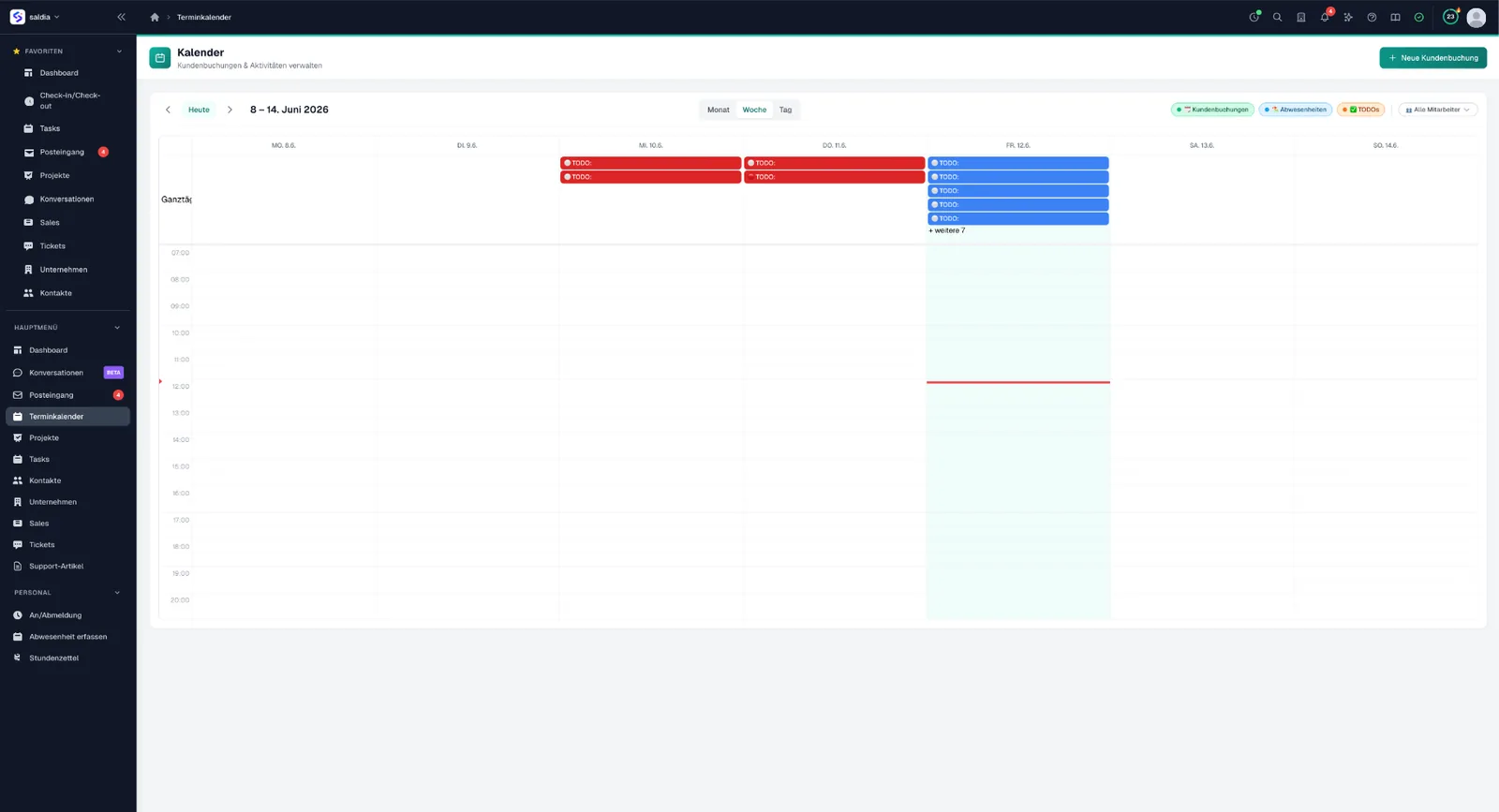
Calendar & Bookings
5 featuresA team calendar with customer bookings and activities: customers book appointments online, your team sees bookings, absences and to-dos in one view.
Online appointment booking
Customers book appointments themselves — in a guided flow through the customer portal.
Google Calendar & Meet
Appointments sync with Google Calendar — including Google Meet links.
Fair team assignment
Bookings are distributed across the team automatically — matching availability and expertise.
Month, week, day
One view for everything: customer bookings, absences and to-dos overlaid.
Rooms & resources
Manage and book rooms right along with it.
Scheduling polls
5 featuresFind meeting slots with customers, partners and your team without email ping-pong — participants vote without logging in.
Vote without a login
External participants get a personal link and vote right away — in German, English or French.
Conflicts visible upfront
While creating a poll, saldiaCore shows which proposed slots clash with your own calendar.
Schedule in one click
The chosen slot becomes a calendar entry — including a meeting link for online appointments.
Invitations sent for you
Everyone receives the confirmation with a calendar file in their own language.
Configurable per poll
You decide on the deadline, visibility, hidden results, maybe-answers and notifications.
Partner program
3 featuresBuild a partner and affiliate program — from codes and tracking to commission payouts.
Codes & tracking
Issue partner codes and track clicks and conversions.
Partner tiers
Group partners into tiers with different conditions.
Commission payouts
Settle commissions cleanly and transparently.
Support & Ticketing
8 featuresBundle support requests from email, WhatsApp, phone and forms into one ticket system — with SLA management and cleanly structured workflows.
Manage tickets
Create, assign, merge and archive tickets with full-text search and attachments.
Multi-channel intake
Requests arrive centrally from email, WhatsApp, the Aircall phone and JotForm.
Tickets from Gmail
Incoming Gmail messages are turned into tickets automatically.
Internal & public messages
Separate internal notes from customer messages, work with @-mentions and attachments.
SLA management
Set response and resolution targets per priority with business-hours logic, SLA pause on waiting status and escalation tracking.
Dynamic statuses & priorities
Maintain separate internal, portal and public views – multilingual.
Macros & templates
Reply faster with templates and placeholders.
Zendesk import
Bring over existing tickets via Zendesk import.
Knowledge base
2 featuresDocument knowledge once and use it everywhere — in hierarchical, multilingual articles for your team, the customer portal and the public portal.
Multilingual articles
Publish hierarchical, multilingual articles – in the customer portal and the public ticket portal.
DeepL translation
Translate single items or in batch, for example whole articles, via DeepL.
Customer portal
4 featuresA dedicated portal for your customers: view and answer tickets, book appointments, read help articles — multilingual.
Tickets in the portal
Customers see their requests and reply right in the portal.
Booking built in
Book and manage appointments — right inside the customer portal.
Status page
A public status page shows the availability of your services.
Multilingual
Portal and articles in several languages — matching your customer base.
Forms
2 featuresBuild your own forms with the built-in builder — incoming submissions automatically become tickets.
Form builder
Create forms with custom fields — no external tool needed.
Straight to a ticket
Every incoming submission lands in support as a ticket.
Projects
4 featuresPlan projects with budget, phases and team roles — templates get recurring workflows moving fast.
Projects with budget
Set up projects with budget, hourly rate and estimated hours.
Phases & milestones
Structure projects into phases and milestones.
Members & roles
Assign team members with defined roles.
Project & task templates
Start projects with predefined tasks from templates.
Tasks & Boards
5 featuresOrganize the work with tasks and Kanban boards — with statuses, priorities, saved filters and bulk actions.
Tasks with detail
Work with custom IDs, statuses, priorities, due dates and task relations.
Kanban boards
Use boards per project plus a global board across all projects.
Bulk actions & merge
Edit many tasks at once and merge tasks together.
Saved filters & views
Save filters and views for quick access.
Comments & attachments
Keep discussions and files right on the task.
Time tracking
8 featuresLog time directly on tickets and tasks – it is automatically assigned to the right customer and project and can be evaluated per customer and project. Billable time can be turned into an invoice directly in bexio, grouped by task, project or date. This is exactly where saldiaCore connects your work to your accounting.
Time on tickets & tasks
Log time on tickets and tasks – customer and project are assigned automatically through them.
Live timer & manual entry
Start, pause and stop a live timer or add time entries manually.
Billable flag
Mark time as billable and keep track of its invoiced status.
Invoice directly in bexio
Turn billable time into an invoice directly in bexio, grouped by task, project or date.
Worked vs. rounded
See the actual worked time next to the rounded billing duration (rounding 0/5/10/15/30/60 minutes).
CSV & PDF export
Export to Excel as CSV or generate a PDF activity report.
Extensive filters
Filter by user, company, contact, project, ticket, date, billable, invoiced and tags.
External logging via API
Log time externally through the API as well.
Internal wiki
5 featuresYour team's internal knowledge in one place — cleanly separated from the public knowledge base for customers.
Page tree with drag & drop
Arrange pages and subpages freely — the structure grows with your knowledge.
Versions with restore
Every edit is kept; older states can be viewed and brought back.
Write together
The editor saves automatically and shows who else is working on the same page.
Internal stays internal
Its own area with its own permissions — internal pages never show up in the customer portal or in public answers.
Part of the search
Internal pages are findable via ⌘K search — for everyone allowed to see them.
HR & people
9 featuresManage your team's working hours, absences and vacation in line with Swiss labour law. The attendance time clock is a separate system, independent of project-based time tracking. Multi-step approvals and balance tracking keep your timesheets clean.
Attendance time clock
Track attendance with multiple sessions per day, office or home-office location and breaks – separate from project time tracking.
Swiss break rules
Automatic break rules under Swiss labour law (15/30/60 minutes).
Timesheet with approval
Multi-step workflow from employee through HR to locked, with deadlines and Google Sheet export.
Absence requests
Request vacation, sickness, military or overtime, including half-days, with approval or rejection.
Vacation calculation
Calculate vacation with part-time support, company holidays and holiday policies.
Automatic calendar entries
Approved absences appear in the calendar automatically.
Employee settings
Store work percentage, weekly and daily hours per weekday and home-office permission.
Balance tracking
Track cumulative hours, target vs actual, over- and under-hours and missing days.
Google Workspace sync
Sync relevant data with Google Workspace.
Gamification
6 featuresMotivate your team with XP, levels and badges for many business actions. Challenges, leaderboards and a reward shop make everyday work more playful.
XP & levels
Earn XP and climb levels for many business actions, with season multipliers.
Badges & achievements
Earn badges and achievements for reaching goals.
Challenges
Take on daily, weekly, monthly and special challenges.
Leaderboards
Compare performance across leaderboards in the team.
Kudos & reward shop
Recognize colleagues with kudos and coins and redeem them in the reward shop.
Seasons & login bonus
Reach milestone rewards per season and collect daily login bonuses with streaks.
AI & Search
6 featuresA built-in AI searches your data in natural language – understanding meaning, not just keywords. It helps in support and advises website visitors. Behind the scenes, several AI providers run with automatic failover.
Hybrid AI search
Via ⌘K from anywhere: ask questions in natural language and get automatic filters across fifteen data types in milliseconds – from tickets and contacts to time entries and focus cards.
Semantic search
The search understands meaning, not just wording: “customer can't pay” also finds “payment failed” – plus synonyms and typo tolerance.
Answer with sources
For questions the search returns a short, grounded answer from your own data – with clickable sources to verify it.
AI support assistance
Get reply suggestions from similar tickets, optimize drafts, summarize conversations in two to three sentences and analyze sentiment and urgency.
Multiple AI providers
Routing across OpenAI, Claude, Gemini and OpenRouter with automatic fallback and per-call credit metering.
Embeddable AI consultant
An anonymous widget uses your crawled website content as a knowledge base, escalates to a human and books appointments.
AI advisor
6 featuresAn embeddable chat widget that answers from your own website content — around the clock. It answers visitor questions, captures leads, books appointments and hands over to a human when needed.
Embeddable chat widget
An anonymous widget for your website — embedded in a few lines, in your tone and multilingual. On duty around the clock.
Answers from your own content
The advisor crawls your website(s) and uses exactly that content as its knowledge base — multiple sources, re-crawled automatically on a schedule.
Hands over to a human
When the advisor hits its limits, it escalates seamlessly to your team — the conversation lands right in your inbox.
Books appointments
Interested visitors book an appointment right in the chat — connected to your calendar.
Captures leads
The advisor collects contact details and confirms them by email — no lead slips away.
GDPR-compliant
Starts anonymous, with automatic anonymization and deletion of old conversations after a set period.
Automations
3 featuresAn automation engine takes over recurring work — you can even generate workflows from a plain-text description.
Automation engine
Combine 4 triggers (created, updated, field changed, time-based) with 6 objects and 15 actions – from sending email and setting fields to webhooks.
Semantic condition ai_match
Use the AI condition ai_match alongside standard operators to match content semantically.
Workflow from text
Describe a process in plain text and let the AI build the whole workflow from it.
Pricing & Plans
Choose the right saldiaCore plan for your business.
Team
Flexible for your team – contact us for a customized offer that fits your exact requirements.
Tailored to your needs
All prices excl. VAT.
Use cases
Concrete scenarios for saldiaCore.
Works with your tools
Connect saldiaCore with the tools you already use.















Frequently asked questions
What is saldiaCore?
Who is saldiaCore for?
Does saldiaCore replace bexio?
How does time tracking with bexio invoicing work?
What AI features does saldiaCore offer?
What does saldiaCore cost?
Where is my data hosted?

Explore more products
saldiaBuild
Your website, built by AI. Hosted in Switzerland.
Describe what you want — saldiaBuild builds it. Professional websites in minutes, SEO-optimized and hosted in Switzerland.
Learn moresaldiaShop
Your professional online shop
Launch your own online shop in just a few clicks. Over 50 apps in the Marketplace and full flexibility — no coding required.
Learn moresaldiaPay
Payments made easy
Accept all common Swiss payment methods — TWINT, credit cards, PostFinance and more. One contract, one dashboard, full control.
Learn moreReady for saldiaCore?
Let's talk about your requirements. Our team gets back to you within 24 hours.
Request demo