New in saldiaCore: a Brand-New Focus Module – and AI in Every Corner
The biggest saldiaCore update since launch: a brand-new Focus module with a personal board, AI across the whole CRM and an AI advisor for your website.
 Men Wälti Updated on 11 min read
This is the biggest saldiaCore update since launch: this week, a completely new module arrived – the Focus module with a personal board, an idea space and live collaboration for your team. At the same time, we brought AI deep into the whole system: into sales, into support, onto the phone – and with the AI advisor even onto your website.
The common thread behind all of it: fewer clicks, less typing, faster to the next sensible step. In this post we show you what's new – and why we built it exactly this way.
The new Focus module: a board for your day
Every business tool shows you what everyone has to do. The Focus module answers a different question: what do I do now? It's your personal space in saldiaCore – deliberately built unlike the rest: fewer options, clear limits, lots of automation.
- Three columns, one principle: "Later", "Today", "Done". Today takes a maximum of three cards at once – not a daily quota, but a simultaneous limit. Finish one and the next moves up. Your head instantly decides what's next instead of scanning a list of twelve items.
- Priority = position: There is no priority field – in practice, "high/medium/low" always ends with everything being "high". What matters is what's on top. Due items quietly sort themselves upward – subtly marked, never screamed at in red.
- Everything assigned to you shows up by itself: Tasks, tickets, projects and deals that are assigned to you and dated appear automatically as cards with an origin badge. Ticking one off really completes the original – nothing that's yours and due stays invisible.
- Capture in a second: Press ⌘J from anywhere in the system, type or speak your thought, hit Enter – the card lands on the pinboard. Sorting comes later, because every required field at capture time kills the impulse to write things down at all.
- The board tidies itself: At midnight, anything unfinished quietly moves back to "Later" – no overdue stamp, the day starts fresh. What sits untouched for weeks falls back onto the pinboard, and a weekly check asks honestly: keep, move or let go?
On top of that, there are three focus levels: the board inside the system, Zen mode (hides navigation and everything else) and the Tunnel – a single card with a small 5-minute timer. The timer is deliberately short: starting is the hurdle, not keeping going. Why we built the board this deliberately reduced – and for whom – is a story we tell in a post of its own.
The pinboard: collect ideas – alone and as a team
Next to the board there's the pinboard: a free idea space where cards sit exactly where you put them. With colored zones and labels you build your own areas – purely spatial, no folder structure. Cards can do more than they look: colors, interactive checklists in the note, Google Drive attachments, "make it a task", assign to team members – and an undo, in case something disappears after all.
It gets really interesting together: shared pinboards are idea spaces for the team – for brainstormings, retros or a SWOT, with ready-made zone templates if you like. Visible to members only or the whole workspace. And on the wall you genuinely work together, Miro-light:
- Live presence – you see who's currently on the wall
- Vote on cards and react with emojis – it quickly shows which idea resonates
- Connect cards with lines – relationships and flows become visible
- A workshop timer sets timeboxes
- At the end, the AI summary bundles all ideas into themes and next steps
An idea worth pursuing goes to you via "to my board" – or you assign it to someone directly. Your personal board always stays private.
Talk to your board – Swiss German included
Our favorite detail – and one notch sharper as of the very latest update: speaking no longer just creates a note. Focus AI understands what you want – and does it. One mode for everything; the AI figures out what you mean:
- Speak a thought and it becomes a clean card – due date and area are recognized along the way.
- Speak a whole stream and several cards appear at once.
- "The quote card to today" – the card moves into the Today column.
- "… is done" – the card gets ticked off. If a real task or ticket sits behind it, the source is completed too.
- "Move … to next Tuesday" – due date set.
- "Break … into steps" – the AI checklist lands right in the card.
All of it is optimized for German and Swiss German – audio-native, at a quality you know from the ChatGPT app. Speak briefly on the go: "Two cards – quote for Muster AG, call the dentist – and the website card to today." Done. The board did it.
Just as important to us was the trust design: after every recording, the board shows exactly what happened – one tap on undo rolls everything back. Anything unclear becomes a note, never a wrong action, and deleting by voice deliberately doesn't exist. A dedicated recording screen – fullscreen on your phone – shows a live level meter, example commands and big done and cancel buttons. Voice commands apply to the cards of your own board; on shared pinboards, voice deliberately only captures ideas, without commands.
And the AI thinks along on the board
The Focus module isn't just new – it thinks along. Five AI helpers take the sorting work off your hands:
- What today? – Empty Today column? One click and the AI picks the most sensible tasks for today from "Later".
- Break into steps – "relaunch the website" becomes concrete sub-steps, right as tickable checkboxes in the note.
- Brain-dump splitter – write everything out in one go, the AI turns it into clean, separate cards.
- Auto-cluster – one click groups a full board by topic.
- Weekly review coach – walks through your open cards with you and recommends per card: keep, move or close.
And nobody has to read a manual
Also new: an interactive tour with which the board explains itself. It dims the page and shows you the real elements one after another – one sentence per step, tap means next, cancel anytime. It exists for the board and for the pinboard, starts automatically on your first visit – and you can bring it back via the lightbulb as often as you like.
Topped up: your board and your CRM are now one
The module had barely shipped when the second wave arrived — six features that mesh the board even more tightly with the CRM:
- Board ↔ CRM both ways: Mirror cards now act back. You edit a TODO's text and due date right from the board — the change lands at the source. You park TODOs on the pinboard, and you attach a thought via search to a ticket, task or deal, where it becomes a real team TODO. Self-created TODOs can be deleted from the board right at the source, with confirmation. In short: your board is the remote control for your CRM.
- Due-date declutterer: When overdue items and “due today” pile up, the board calmly offers a cleanup. Focus AI suggests per entry: the most important stays today, the rest spreads realistically across the week, vague evergreen tasks lose their pseudo-date. Every line can be adjusted, one click applies it all — and without activated AI, a solid distribution fallback kicks in.
- Self-sorting Later column: From about ten cards, “Later” groups itself — overdue, due today, this week, later, no date — collapsible, no manual work. And when you set a date, a quiet hint appears: “12 things are already due on this day.”
- Share → saldia: From any mobile app via the share menu straight onto the pinboard: a link becomes a chip, text becomes a note, an image or PDF attaches. Requires the installed app with a logged-in user.
- Recurring cards: Routines like “weekly report every Friday” run by themselves — completing one automatically creates the next instance, never retroactively overdue.
- Dashboard widget “Focus — Today”: Your Today cards right on the CRM dashboard, with one-click tick-off and a done counter.
Plus three small things that make a difference: the central button of the mobile bar can be assigned to Focus AI — one tap, speak, done, including the new command “attach a TODO to ticket X: …”. On your first board visit of the day with an empty Today, the board offers “What today?” by itself — once a day, no pressure. And the interactive tours explain all the new features right on the real screen.
AI right inside the CRM: sales, support, phone
The second part of the update runs through the entire system. The AI doesn't just summarize – it works along, exactly where context used to cost you search time:
| Feature | What it does |
|---|---|
| 360° account briefing | One click on a company or contact sums up the complete history – tickets, deals, activities, conversations – into a crisp briefing. Before the call, you know everything again. |
| Deal AI | Rates every deal: momentum (hot, warm, cold, dormant), win assessment, risks, next steps. And it drafts the matching follow-up right away – as email or WhatsApp, in our tone, with your name already in place. |
| Call intelligence | Calls via the Aircall integration are transcribed and automatically turned into a summary plus to-dos – right on the call entry. Hang up, captured, done. |
| Ticket summary | A long ticket thread is captured in two sentences at the push of a button. |
| Similar tickets | Finds genuinely related past tickets – semantically, not just by keyword. Spots possible duplicates and shows, for solved cases, how they were solved back then. Gets better as your ticket history grows. |
| Knowledge article from ticket | Automatically turns a solved ticket into a depersonalized draft for the knowledge base. Solved once, documented forever. |
The AI advisor: your new module for the website
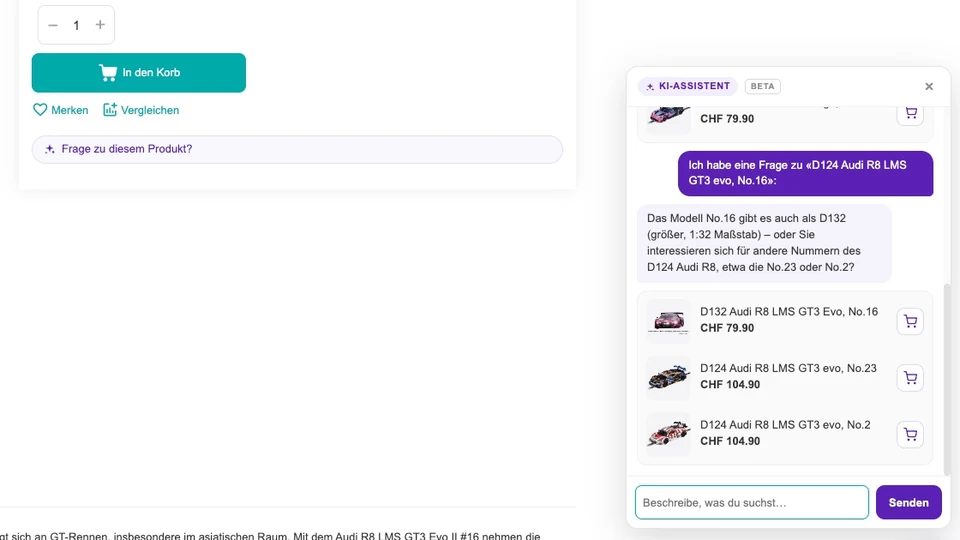
Also new as its own module: the AI advisor – an embeddable chat widget for your website that answers visitor questions around the clock. The special part: it doesn't answer from generic knowledge but from your own website content, which it automatically re-reads on a regular basis. When it hits its limits, it escalates seamlessly to your team – the conversation lands right in the inbox. Interested visitors book an appointment from your calendar directly in the chat, contact details are captured and confirmed by email. And because it starts anonymous and old conversations are automatically anonymized and deleted, the whole thing stays cleanly privacy-compliant.
Not everything is new: the AI foundation was already there
By the way, the AI push doesn't start from zero. saldiaCore already came with a solid AI foundation – and the new features build right on top of it:
- Hybrid AI search: Ask your question in natural language – the search understands what you mean and automatically filters across twelve data types, from tickets and contacts to time entries and activities.
- AI when replying to tickets: While answering, the AI suggests replies drawn from similar past tickets, polishes your drafts and analyzes the sentiment and urgency of a request – so the right answer goes out faster.
- Automation engine with "workflow from text": Recurring processes run automatically – triggers, conditions, actions, all the way to webhooks. And for a new workflow, you simply describe it in a sentence and let the AI build it. With the semantic condition ai_match, it even checks content by meaning, not just by keyword.
- DeepL translation: Translate content – entire knowledge articles, for example – individually or in batches via DeepL.
Together with the new features, this makes a system where AI isn't a bolted-on gimmick but works along throughout.
Transparent, flexible, modular
This much AI raises two fair questions: what does it cost – and am I at one provider's mercy? Our answers:
- Transparent credit system: Every AI use runs on credits – a monthly quota plus optional prepaid balance, visible in the workspace at any time. You see exactly what the AI costs. No surprises.
- Free model choice: OpenAI, Anthropic and Google Gemini are ready – provider and model can be set per feature. You're not chained to anyone.
- Fully modular: Every feature belongs to a module that can be switched on or off per workspace. You use only what you need – and hide the rest.
The only requirement for all AI features is that AI is activated with credits in your workspace – after that, everything is ready to go.
Want to try it yourself?
saldiaCore is our all-in-one business software for Swiss SMEs: CRM, support, projects, time tracking and HR in one solution – with bexio integration, and now with the Focus module and AI in every corner. You'll find all 20 modules in the module explorer on the saldiaCore product page.
The best way to see it is live: in a no-obligation demo, we'll walk through your setup together – from the focus board to the deal AI. Request a demo – we'll get back to you from Burgdorf.